Saturday, October 19, 2019

Top tricks about whatsapp perhaps you don't know

WhatsApp Tricks and Tips | Cool Whatsapp Tricks [2019]


WhatsApp Tips and Tricks: Before learning directly Whatsapp Tricks and hacks, first know some facts about the whatsapp. WhatsApp has turned into the best, most widely used and trusted messenger for mobile platform in today’s time. It is easily accessible for all mobile platforms including the iPhone, Android, Blackberry, Nokia, Symbian, Java, and many more.
Only an internet connection is required for sending and receiving unlimited messages to anyone you like. It is absolutely free of cost. Here We Share some Best WhatsApp Tips and cheats  For You. ðŸ™‚

Best WhatsApp Tips And Tricks For WhatsApp Lovers

1) Change Profile Picture – Of Your Friend’s ðŸ˜€ ðŸ˜›

This is new and an awesome whatsapp trick to prank your friends. You simply need to make some easy file replacement to change the actual profile picture of your friend. So research some real funny / scary images that would give 440 volts shock to your friend and resize it to 561 x 561 Pixel dimension.
Try using the feature ‘RIOT image resizing’ to achieve this. Now it is time to navigate to SD Card and choose Whatsapp. Go to Profile Pictures where you see the profile picture of your friend. It will have name and phone numbers similar to your friend’s. This is one of the best whatsapp trick 2019.
Change Profile Picture WhatsApp Tricks and Tips
Change Profile Picture Of Your Friend
These will have prefix attached. Simply rename the new chosen image to that same file name. Now replace the old image with the new one.
You can use the iFunBox for iOS device. For android, try and use file manager to attain this effect. Now it is time to restart your device and the new profile picture will be visible. You can call and show this to your friend. Just tell them they have uploaded an ugly picture and enjoy their reaction.

2) Hide Your Profile Picture

Hide Your Profile Picture WhatsApp Tips and Tricks
Hide Your Profile Picture
This is a good thing to do either to shock your friends of some privacy concerns. The WhatsApp Plus screen will help you. There are a lot of fakes available for WhatsApp Plus on the internet.
The application can be downloaded from a trusted source. Once installed it allows you to hide your profile on WhatsApp. This makes you possible for you to make an anonymous chat.

3) Use WhatsApp without Any Mobile Phone Number

Use Whatsapp Without Mobile Number, This is possible! First, uninstall WhatsApp if already installed. Save image files / video on WhatsApp. Now download and install new WhatsApp. You must lock messaging service via changing the flight mode. Open WhatsApp and add your number to it.
This way, it will not send message to the server to verify your mobile number. Since the verification is still unfinished and messages are blocked, the application will ask you to select an alternative system to confirm. Now simply choose ‘Check through SMS‘. Now you must enter your email address. Click ‘Submit’.
Don’t wait and click “Cancel”. Forge messages and install the message Spoof text message. Use Fake-a-Message for iPhone. Now visit the Outbox and copy details of messages and select Spoofer Application. Send the details to false verification. Now the details should be used in false message:
Use WhatsApp without Any Mobile Phone Number
WhatsApp without Any Mobile Phone Number
  • To: +447900347295
  • From: + (country code )
  • (mobile number )
Now message your e-mail address. A message is sent to fake number. It is now possible to use the number to get connected to friends.

4) Hack Friends WhatsApp Conversation

Hack Friends WhatsApp Conversation - WhatsApp Tips and Tricks
Hack Friends WhatsApp Conversation
This is an awesome WhatsApp trick that can be used to hack WhatsApp conversation of your friends. You can effortlessly grasp the .crypt files from SD Card of your friends. Thereafter, you can view them on the internet using the website ‘RecoverMessages’. Explore the friends SD Card and then navigate to:
  • SD Card
  • Whatsapp
  • Database folder
This is where you will get two files – ‘msgstore-yyyy..dd..db.crypt’. This will precisely contain date and year whenever the backup was created. All you need to do is copy the files to your PC and upload to “RecoverMesages.com”.
This will help you view these online. This is the best way to hack Whatsapp Database of your friend. You can now view all the conversation.

5) Hide “Last Seen” Timestamp

If you want to private your visit on WhatsApp then you must know about this whatsapp trick, Actually when you will see any messages of friends, then Your friends can easily find your visiting time by given last seen option.
So, your privacy is not secure, But if you wanna hide your visit(last seen), Then you must change by default setting of WhatsApp.
Settings >> Chat Settings >> Advanced and set Last Seen Timestamp to Off

6) Backup And Restore Your WhatsApp Chats Conversation

If you want to Backup your friends chat conversation, you want to format your mobile or android phone, Then you can back up it, It will help you to restore your friends conversation on your android device.
WhatsApp Chats Conversation Backup
For your Android Settings >> Chat settings and tap Backup conversations
To save this conversation use a file manager and save it like /sdcard/WhatsApp/Media.
For iOS Backup – Settings >> Chat Settings >> Chat Backup, then tap Backup Now.

7) How to Disable WhatsApp Auto Download Images and Videos

WhatsApp auto download images and videos from the conversation chats, It will create a lot of mess in your mobile gallery. Sometimes also it may kill your mobile data and battery life. This trick will help you to stop auto download images and videos from the chat.
Open the Whatsapp >> Settings >> Data Usage >> Media Auto-Download.
Disable WhatsApp Auto Image Download
Disable WhatsApp Auto Download Images
Now You Can Access WhatsApp On Your Google Chrome Browser or any browser through Web.WhatsApp.Com.

Sunday, October 13, 2019

Top tips about twitter

7 Twitter tips for charities - how to write better tweets

Twitter better tweets
Could your tweets be better? More engaging? More discoverable? More retweetable? Here are 7 simple tips to keep on hand when writing a better tweet. Plus we've created an easy infographic to keep and share!

1 Use #Hashtags

Use-HashtagsMaybe this is a pretty obvious one to start with but I do see a lot of people twittering away without them. Hashtags are how you identify your content as relevant to a certain field or group of people, it’s one way that new followers will find you and it is a way for your message can be found in the throng. Of course #overuse of #hashtags is #also a #badidea as it makes your #tweet #unreadable. You can get away with two or three though I think, add them either in context or at the beginning or end of your tweet.

2 Add your thoughts

Add-your-thoughtsDon’t just retweet things willy nilly - it is almost always a good idea to add your tuppenny-worth to other peoples tweets that you have found to be worth sharing. It only takes an extra minute and lets your followers know why you are sharing the message or endorsing the link. 

3 Credit the source

Credit-SourceAlways remember to credit your source - this can only strengthen your network as your peers will know you are sharing their content/ talking about them/ endorsing or supporting what they are saying. Also you won’t really gain anything by appearing to have broken the news.

4 Take more photos and upload more images

Upload-more-imagesEveryone likes pictures and aside from the thousand word cliche they break up the constant stream of text - especially when viewed from some of the more advanced twitter apps and clients, which are becoming more and more widespread.

5 Identify your audience

Identify-your-AudienceIt’s important to let the people you are talking to know that you are talking to them. Remember your message is surrounded by hundreds of others, whether your follower (or potential follower) is looking at their feed, your timeline or a search you want your tweet to stand out to the people it is intended to reach.

6 Write your own tweet

Write-your-tweetsLots of services and apps will hook into your Twitter account and auto publish a tweet for you. For example you publish a new post on your blog and this is automatically tweeted usually in the format [title] [link]. You will always come up with a better tweet if you take a minute to write that yourself, maybe add a hashtag in your title or identify a specific group of followers this particular post is intended for.

7 Know when to be an organisation and when to be a person

Be-humanDon’t just go using your charity’s twitter account for bland and faceless link pushing or broadcasting charity news or donation requests, that’s not really what the medium is for and you won’t be using it to its full potential. Above all else Twitter is a networking tool and is best used to have conversations ~ engage in conversation with your donors, volunteers, fundraisers, stakeholders and peers.

Saturday, October 12, 2019

Top tips about Instagram


50 BEST INSTAGRAM TIPS… EVER


Instagram is constantly changing and evolving. It can be hard to keep up with it all. I’ve decided to put the 50 best Instagram tips all in one place. I want to make it easier for you to increase your followers and grow engagement.
I’ve been blogging for nearly seven years. I’ve been on Instagram since 2012. Even though my current job is blogging, my background is in social media and marketing. I’ve run Instagram accounts for large companies to small businesses. So it’s safe to say I’ve been in the game for a long time.
I wanted to put together the best tips on Instagram so you can see them all in one convenient place. I’m covering things like when to post, what hashtags to use, and how to grow your Instagram account. I’ll also focus on my current favorite Instagram tool: Instagram Stories. And I’ll deep dive into how you can beat the Instagram algorithm and gain tons of engagement.
Report this ad
I plan to update this post regularly with new tips and tricks. And while I will be linking to my blog posts, I’ll also link to others that provide helpful strategies that will help you up your Instagram game.

50 BEST INSTAGRAM TIPS

Whether you’re just starting your Instagram journey or you’ve been on it for a while, there is always room to improve and learn. In fact, that’s what’s so fun about this platform. There’s always something new to learn.

INSTAGRAM STRATEGIES

The Instagram Algorithm is one of the toughest nuts to crack. It’s constantly changing and evolving. So how can you be sure that you’re doing everything right? I’ve taken a hard look at the Instagram Algorithm and how you can beat it to get the most engagement.
Report this ad
One of the best ways to guarantee engagement on Instagram is by posting at the right time. But what does that mean for you? This post explains the universals as well as how to find your right time.
There is a lot of misinformation on Instagram. That’s because Instagram is fairly hush-hush on sharing what their platform is all about and how it works. Many bloggers like to share their tips but might not have a full understanding of the platform. Bottom line: don’t believe everything you read. Here’s what we know is incorrect and common mistakes you could be making.
Many report trouble with being seen on Instagram. This can be for a number of reasons. You could be using banned hashtags (more on hashtags below!) or breaking the terms of service on Instagram. Many have coined the term “Shadowban” to describe when you aren’t being found. This sounds like a scary term but I break down what it really means and how you can fix and avoid it.
Report this ad
One practice to never utilize is buying followers. In case you don’t believe me, here’s how it can truly hurt your engagement.
While Instagram is a great tool and we want to grow our followers, it’s actually one of the big reasons I was able to grow my blog and get pageviews. I believe Instagram is one of the most important tools for a blog or a business currently. Don’t believe me? Here’s an infographic showcasing the influence of Instagram in our world.
doubled my Instagram following in six months by putting into practice a few strategies that really changed how people found me. Remember, you can post great stuff, but if people can’t find you then you won’t grow. I recommend keeping your profile public and signing up for a business account.
If you’re stuck in a rut and looking for something different to try on Instagram, try these different approaches. You might be surprised that science can play a big role in understanding Instagram.
Report this ad
Posting consistently, creating a killer profile, and establishing a community are surefire ways to grow your Instagram. Making sure all these elements work together is a great way to create a powerhouse account.

INSTAGRAM CAPTIONS AND HASHTAGS

While pictures are hugely important, the caption is how you reveal more of yourself. Creating a connection in your caption is one of the best ways to create an audience that cares and comes back when you post. Here are some great caption ideas and how to create one that inspires engagement.
A great way to create engagement is by asking a question on Instagram, as this post suggests from Humble & Whole.
Hashtags are essential to being found on Instagram. They are a simple way to connect relevant content and, in my opinion, a great way to organize and find your posts. I hashtag all of my posts by country so I can easily go back and find my posts.
Report this ad
Here are some helpful hashtag posts:
I recommend hiding your hashtags by using dots. This looks like this:
.
.
.
#your #hashtags #go #below.
This way when you add hashtags in captions it won’t look so spammy. Remember, you can use up to 30 hashtags. There is a lot of debate on the number to use but I still suggest using all 30.
Need some hashtag ideas? I’ve got you covered!

INSTAGRAM STORIES

Instagram Stories are my FAVORITE part of Instagram. This innovative aspect is the best way to really connect with followers and get discovered. This Ultimate Guide to Instagram Stories will help you understand how best to use it as well as my favorite tips and tricks. Such as, how to add funky colors, fonts, swipe ups and more.
I also offer an Instagram Story challenge to help you get in the groove with posting regularly. I recommend posting to Instagram Stories once a day to gain more engagement.
Now that you’ve got a good handle on Instagram stories it’s time to take it up a notch and add Instagram Story Highlight covers. That’s definitely a mouthful. But it’s worth it to create a cohesive looking feed.

Thursday, October 10, 2019

Top tips about whatsapp

 Top tips about whatsapp


WhatsApp is oneof the hottest social 
networking apps around thanks to features like free video calls and the ability to delete messages. However, even if you use WhatsApp regularly, you might have missed some of its best features.
In this article we take a look at some awesome WhatsApp features. And while some users may regard these as essential WhatsApp features, other users may discover previously unknown tricks they can add to their arsenal.

1. Tweak Your WhatsApp Privacy Settings

whatsapp-privacy-settings-on-iphone
You don’t always want everyone to know when you’re online, or whether you had a chance to see their last message. Sometimes you want a bit of time to think before you have these conversations.
You might also have good reason to make sure that only certain people see your profile picture. In fact, it’s pretty unlikely that you’d want anyone but your friends to see your profile picture at all.
Head to Settings > Account > Privacy and you can tweak all of your WhatsApp privacy settings. By default everyone—not just your contacts—can see your last seen time, status message, and profile picture, which might be sharing a little too much.It’s strange that an app that decided to have great encryption decided also to have overly public default privacy settings. It’s up to you to make WhatsApp more secure and private.
Note: This is also where you’re able to turn off read receipts if you wish. However, if you do this you won’t be able to see other people’s read receipts.

2. Back Up Your WhatsApp Messages

whatsapp-chat-backup-settings-on-iphone
If you never want to lose a single WhatsApp message ever again, you need to back up your chat history. To do this, go to Settings > Chats > Chat Backup and tap on Back Up Now.
If you’re on iOS, the backup goes straight to your iCloud account. On an Android device, it goes to your Google Drive account. Of course, you’ll need to be logged into the relevant cloud storage account first.
It’s best to put your backups on autopilot and forget about them. That’s where the Auto Backup option comes in handy. It lets you back up your chats on a daily, weekly, or monthly basis. (You can specify if you want to include videos in the backup.) Now, if you accidentally delete WhatsApp messages, you still have some hope of recovering them.

3. Export Individual WhatsApp Chats

include-media-option-for-exporting-chat-from-whatsapp-on-iphone
If you want to share specific chats via email, Slack, or some other service, you’ll need to export them first using the Export Chat option. You’ll find this in the Contact Info section (Group Info section for groups) which shows the contact’s name, phone number, status message, etc
The exported chat appears as a ZIP file that you can share with others. During export, you can specify whether the file should include attached media.
By the way, you can also download WhatsApp status photos and videos shared by others, but it’s debatable whether you should do so.

4. Change the WhatsApp Wallpaper

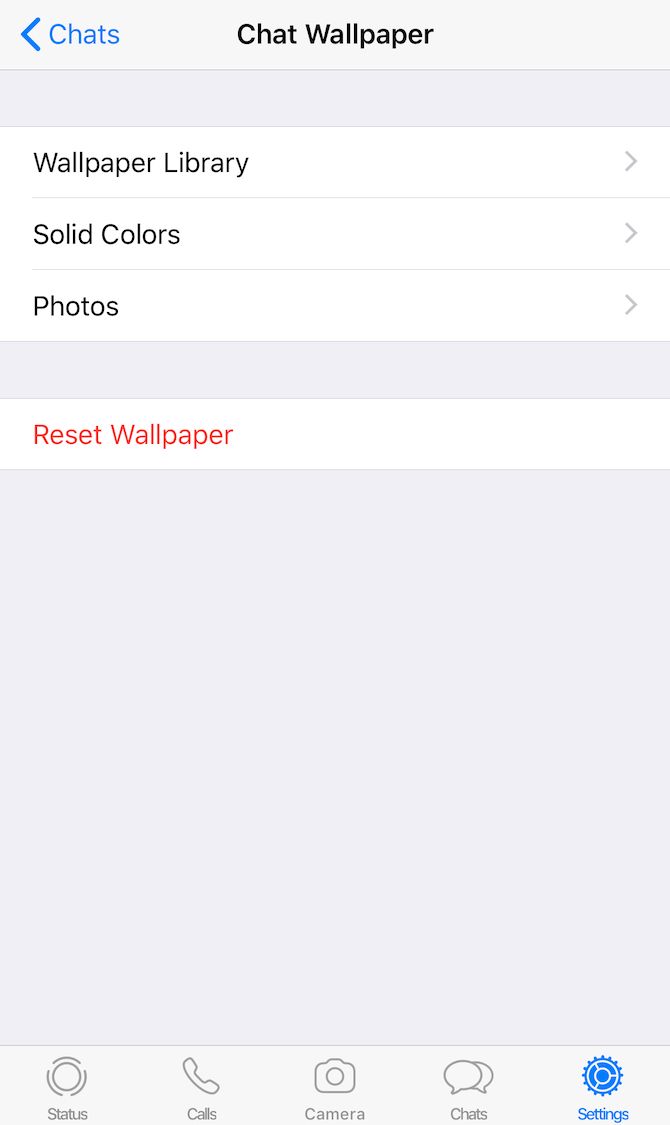
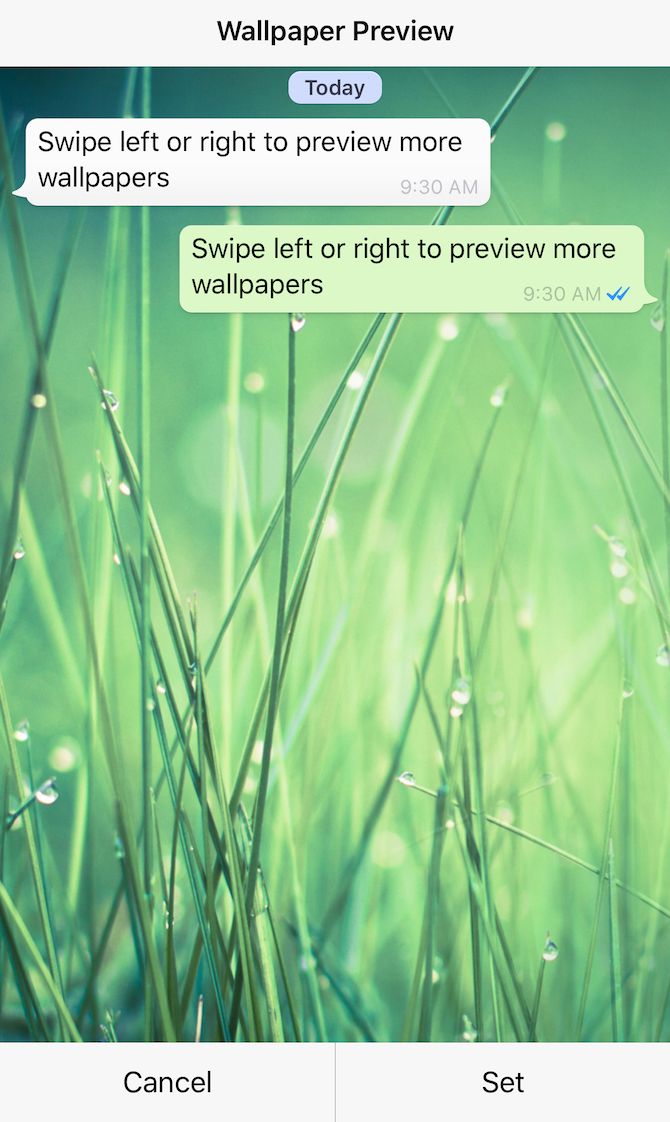
Chatting on WhatsApp doesn’t have to be a bland experience, as it’s really easy to change the background. Head to Settings > Chats > Chat Wallpaper and you can grab a new background from the in-built wallpaper library. You can also choose a solid color or one of your own photos as the wallpaper.
Want the original WhatsApp wallpaper back? All you have to do is tap on Reset Wallpaper.

5. See Exactly When WhatsApp Messages Were Read

If you’re keen to check whether your friend knows about your party or not, you can easily see if they’ve read the messages you sent or not. Just view the conversation and look for the blue ticks to know whether your latest message has been read (if they have read receipts turned on).
Need more information? Long-press on the relevant message and tap on Info to see exactly when that message was delivered and when it was read.
Keep in mind that you’ll see a couple of gray ticks if your friend hasn’t read the message and a single gray tick if it hasn’t been delivered yet.

6. Check Your WhatsApp Data Use

whatsapp-network-usage-stats-on-iphone
No one likes excessive data charges, so it’s worth being able to check how much data WhatsApp is using. To do this, go to Settings > Data and Storage Usage > Network Usage and you can get the full details of all your data consumption.
If you want to keep your data usage down, tweak the media auto-download and call settings under Settings > Data and Storage Usage. Here, you can restrict automated media downloads to Wi-Fi connections or turn them off completely to save on mobile data. Opting for a lower voice call quality also helps keep data usage down.

7. Use WhatsApp on a Desktop

whatsapp-web-qr-code
As long as your WhatsApp-enabled smartphone has an active internet connection, you can use WhatsApp on your PC.
To get started, head to web.whatsapp.com on your computer. Next, open WhatsApp on your phone and visit Settings > WhatsApp Web/Desktop. Now point your phone at your computer screen to scan the QR code displayed there. Your chats should then show up instantly.
You can also use this method to access WhatsApp on a tablet, but you’ll need to request the desktop version of the WhatsApp Web site first. It’s a pity that this method doesn’t seem to work for everyone; I have had no trouble with it.

8. Transfer Your WhatsApp Account to a New Number

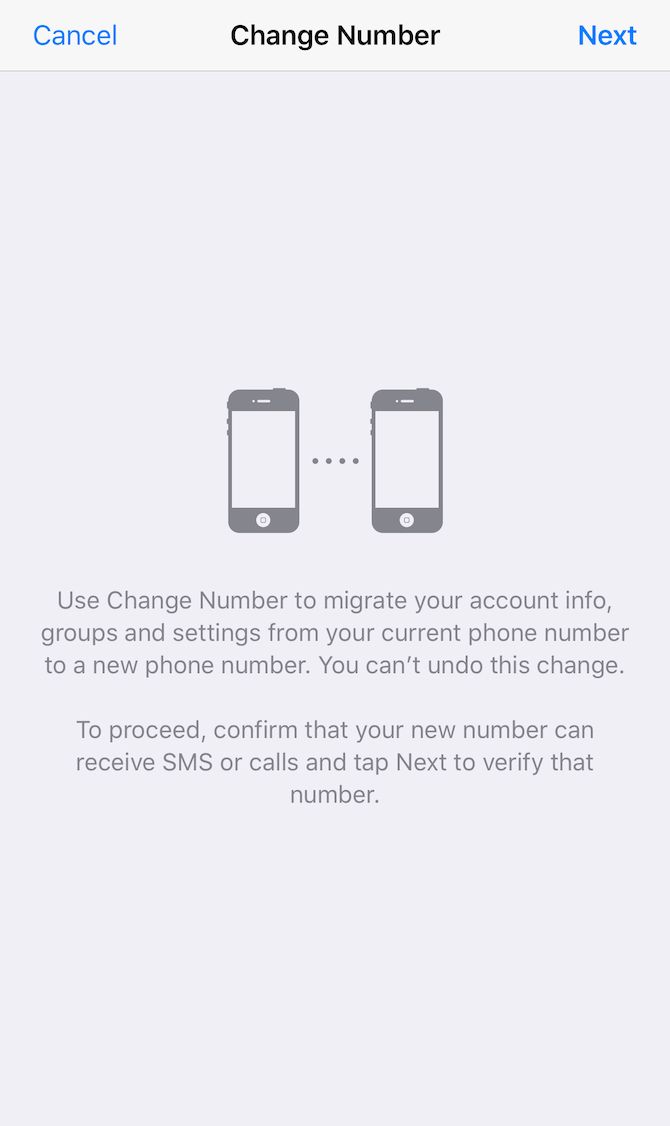
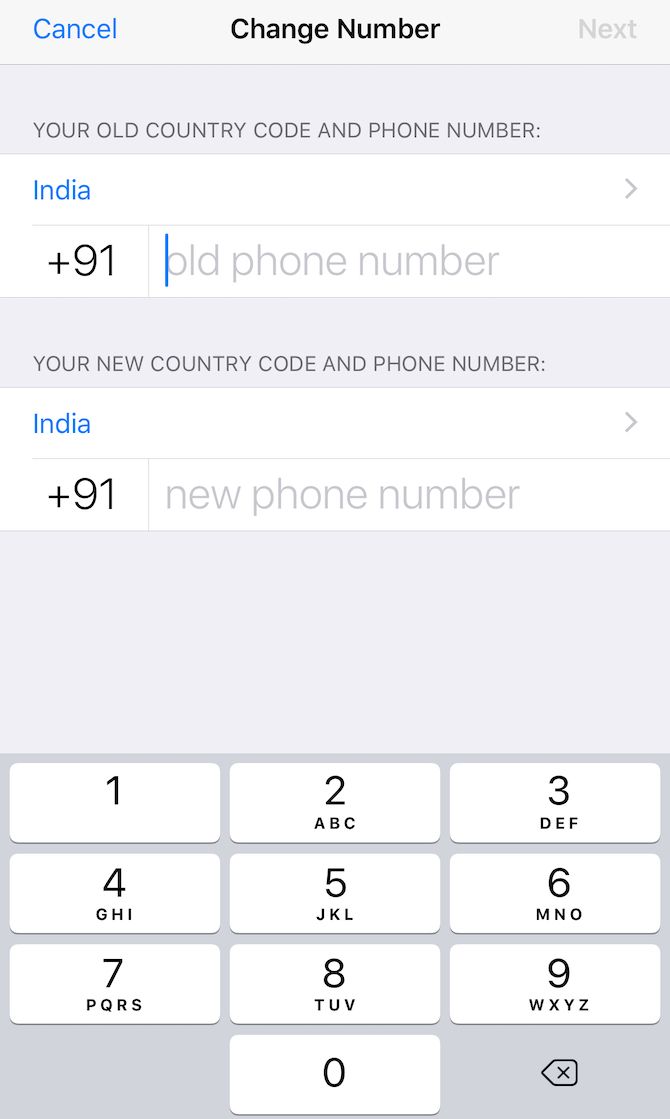
Changing to a new mobile number doesn’t mean the end of your WhatsApp account—it’s possible to transfer it to the new number. Head to Settings > Account > Change Number to start the process. You’ll need to enter both the old and new numbers to migrate the data properly.

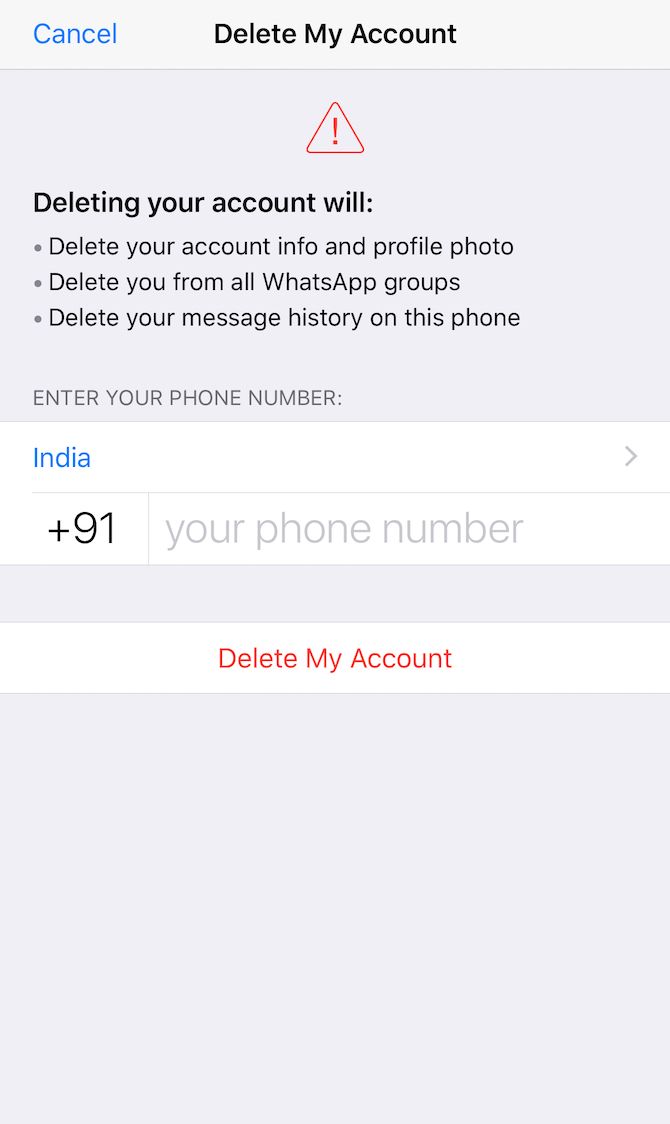
9. Delete Your WhatsApp Account

If for some reason you want to delete your WhatsApp account altogether, head to Settings > Account > Delete My Account to get started. You can always start a new account later if you change your mind, but your chat history from the current account will be gone forever. The cloud backups of your messages also vanish. Plus, you’ll disappear from groups and the contact lists of your friends.
Keep in mind that any conversations you have been a part of are still visible to your contacts since those conversations are also a part of their chat history.

Wednesday, October 9, 2019

Tips about Facebook


Top tips about Facebook perhaps you don't know.


Over 1.5 billion people regularly use Facebook.
And as the social network has grown, the rate at which Facebook shares news, and releases new features and products has accelerated.
It can be a little hard to keep up sometimes.
With this in mind, I’d love to share 11 Facebook tips, tricks, and facts with you.
This post will give you plenty of great stuff to help you get the most out of and better understand Facebook. From why you get shown certain ads and which types of posts get the most engagement, to how closely connected you everyone else on the planet and much, much more.
Let’s go!

pablo (19)

1. How to edit your Facebook ad preferences

Have you ever seen a random ad appear in your timeline and wondered why Facebook is showing it to you?
It probably has something to do with your Advert Preferences – a selection of topics Facebook believes you’re interested in based on your profile, Pages you like or engage with, ads you click on and apps and websites you use.
It’s super interesting to understand more about what topics Facebook believes you’re interested in and within your Facebook settings, you can view and even edit these preferences.
To take a peek at your preferences, click on Settings in the top right corner of Facebook:
fb-ads
Then select Adverts, and click ‘Edit’ next to ‘Ads based on my preferences’:
fb-ads-edit
You’ll then see the below screen, click ‘Visit Ad Preferences’ to view and edit your preferences:
ad-preferences
Now, you’ll be taken to the page where you can view and edit all of your ad preferences:
ads-preferences
It’s fascinating to dive into each category and check out the topics listed within your preferences. If you’d like to remove any of your preferences, and not receive ads targetted to that topic, you can do so by hovering over and clicking the ‘x’ button:
remove-preference
(h/t to Katie Notopoulos over at Buzzfeed for this tip)

2. Images posted via Instagram receive more engagement than native Facebook image posts

A Buzzsumo study of over 1 billion Facebook posts from 3 million brand pages found that images posted to Facebook via Instagram receive more engagement than natively published images:
facebook-image-engagement
This is particularly interesting, as often, cross posting from one platform to another results in less engagement (native Facebook video vs. embedding a YouTube video on Facebook, for example).
However, with Instagram being owned by Facebook, there could be some benefits for Facebook by making posts from Instagram more visible in the timeline.
Have you tried posting images to Facebook via Instagram? I’d love to hear if you noticed any difference in engagement in the comments below.

3. The six degrees of separation are shrinking

Six degrees of separation is the theory that everyone in the world is six or fewer steps away, by way of introduction, from any other person. However, thanks to social media, it appears the six degrees are now shrinking.
According to a Facebook studythe six degrees of separation has now become the three-and-a-half degrees of separation, as Facebook explain on their research blog:
Each person in the world (at least among the 1.59 billion people active on Facebook) is connected to every other person by an average of three and a half other people.
The majority of the people on Facebook have averages between 2.9 and 4.2 degrees of separation as the below graph shows:
degrees of seperation
This highlights how social media, and Facebook, in particular, is making us more connected. You can find out more about this and find your degrees of separation over at the Facebook research blog.
Below are my degrees of separation and those of a few Facebook employees:

4. How to download all of your Facebook information

Almost everyone who uses Facebook has lots of information, content and memories stored within the social network.
If you’d like a backup of all your Facebook data – including photos – you can download everything in a few simple steps:
  1. Head over to your Facebook Settings page
  2. Click Download a copy of your Facebook data below your General Account Settings
  3. Select ‘Start My Archive’ to get your download going
download-facebook
Pro tip: The data that you download from Facebook contains a lot of sensitive information like inbox messages, photos and more. It could be a good idea to keep it all saved in a safe location.
For a full list of what’s included when you download your information, check out this page on the Facebook Help Center.

5. Posts with hashtags receive less engagement than those without

Buzzsumo’s study of over 1 billion Facebook posts discovered that posts on Facebook that include a hashtag receive less engagement than those without hashtags, as illustrated in the below graph:
hashtag-engagement
Hashtags have become a default way to categorize content across Twitter and Instagram, but not made much impact on Facebook. Do you ever use hashtags on Facebook? I’d love to hear your experience in the comments below this post.
This also highlights the importance of sharing a different message across each social media platform. For example, here’s how I might share the same post on Twitter and Facebook:
Share on Buffer

6. How to save links for later

Often, when I browse my Facebook Newsfeed, I spot something that grabs my attention but don’t immediately have time to read a post or watch a video.
If you’re even in this situation, Facebook has a really neat feature allowing you to save a link to come back to later. Here’s a snapshot of my saved content:
facebook-saved
If you see something in your timeline that you’d like to save for later, you can click on the drop-down menu in the top right corner and click ‘Save Link.’
Here’s how it looks on desktop:
save link
And on mobile:
saved-image
To find your saved posts again you can head to https://www.facebook.com/saved/ and on mobile tap ‘More’ from the navigation and then you should see an option for Saved:
saved-mobile

7. Almost half of Facebook’s users are mobile only

What’s even more interesting is that nearly half, around 46%, of Facebook’s users never log in to the desktop site and use Facebook only on mobile devices.
Screen Shot 2016-02-11 at 12.01.08
Will we soon hit the tipping point where the majority of Facebook users are mobile-only? VentureBeat predicts that we could reach that landmark at some time in 2016.

8. How to sync your Facebook Calendar with Google Calendar

I find this one is extremely helpful. My calendar is like my personal assistant, and I use it to plan and organize both my work and social schedules.
If you use both Facebook events and Google Calendar, combining the two is amazingly useful and pretty simple. Here’s how to do it:
Head over to Events on Facebook, and click on one of your ‘Upcoming events.’ Once you’re on the event page, click on the ‘Options’ button and select ‘Export Event’ from the dropdown, as shown below:
export-event
Next you’ll see the below lightbox popup. Here you’ll want to copy the URL under ‘Subscribe to all upcoming events on your calendar.’
save-url
Once you’ve copied the URL, open up Google Calendar and on the left-hand side you’ll see an option called ‘Other Calendars.’ Click on the drop down next to ‘Other Calendars’ and choose “Add by URL” as shown below.
Once the lightbox opens up, insert the URL you copied from Facebook and your Facebook events will now sync with Google Calendar.
google-calendar

9. How to search your video library

If your brand uploads a lot of video content to Facebook, there’s a useful Video Library feature that gives you a list of all the videos you’ve uploaded as well as multiple ways to filter them.
To find your Facebook Page’s Video Library, head over to your Page and click ‘Publishing Tools.’
publishing tools
From the Publishing Tools page, then select the Video Library option on the left-hand side:
video-library
This is a great way to filter through all of your Facebook videos and discover your most successful content at a glance. You could consider re-sharing some of your most highly viewed content or using it as a blueprint for future video posts.

10. Facebook’s audience is growing up in Western markets

Facebook was founded in 2004, and as its twelfth birthday approaches, it’s not just the social network that has matured. So have its users – in Western markets, at least.
Millennials make up a smaller share of Facebook’s users in Western markets than in developing nations. In the U.S., for instance, there are 17 percent more people over the age of 40 using the social network than their younger counterparts. Additionally, 33 percent of Facebook’s audience is under age 30. By comparison, in India and Indonesia, 75 percent of its users are millennials or younger.

11. Messenger has over 800 million users (is social media becoming more private?)

2015 was a huge year for Facebook Messenger and the app now has over 800 million monthly active users.
The below graphic shares some more of Messanger’s 2015 highlights:
messenger2016
On Facebook’s Newsroom, David Marcus, VP of Messaging Products at Facebook explains that the Messenger team’s mission is to “make Messenger the best place to communicate with all the people and businesses in the world.
As Messenger, and more private social media and communication platforms boom, it feels like social media is becoming a little less about sharing our lives publicly, and more about connecting on a personal level with the people closest to us.
seperation